What are the benefits of ergonomic lounge chairs? It is more than a comfort question. It concerns posture, pressure distribution, movement, and daily recovery. A thoughtfully designed chair can support the lower back, cradle the pelvis, and reduce uncomfortable pressure points. These details matter during reading, nursing, gaming, or short work sessions. The World Health Organization reported that low back pain affected 619 million people worldwide in 2020. It projects the total could reach 843 million cases by 2050 (WHO, 2023). This evidence does not prove that a lounge chair prevents pain. It shows why seating deserves closer attention.
Ergonomic value depends on fit, not attractive product photographs. ANSI/BIFMA G1-2017 links ergonomic furniture design with user adjustment, body dimensions, and task demands. NIOSH also identifies awkward postures and prolonged static loading as workplace risk factors. A supportive lounge chair may encourage small posture changes through reclining, foot support, and flexible positioning. That can feel different after an hour, especially when shoulders relax and feet rest fully on the floor. Small changes matter.
Still, no chair is a cure. Even an expensive model can perform poorly when its seat depth is wrong. A soft cushion may feel pleasant initially, then restrict movement. Personal height, mobility, room layout, and usage time all influence results. This article examines the practical benefits, design features, and limitations of ergonomic lounge chairs. The goal is useful guidance, not exaggerated promises. Real comfort is personal. That deserves honesty.
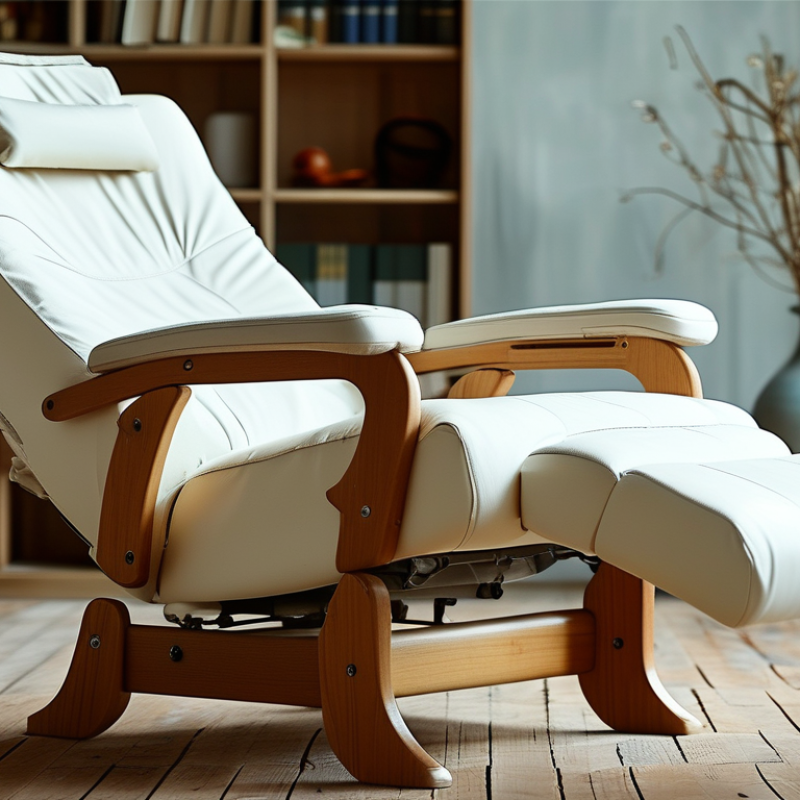
An ergonomic lounge chair is designed to support the body during relaxed, seated activities. It is not simply a wide chair with thick cushions. A credible design usually combines adjustable recline, lower-back support, a supportive headrest, stable armrests, and a footrest that keeps the legs comfortable. The seat should distribute pressure without forcing the pelvis forward. Your feet should rest securely, while your shoulders remain relaxed.
The chair should fit the person, not the other way around. OSHA guidance on computer workstations emphasizes neutral alignment, supported backs, and relaxed shoulders. These principles also apply when reading, watching television, or working briefly from a lounge chair.
A 2020 World Health Organization guideline recommends 150–300 minutes of moderate physical activity weekly and warns against excessive sedentary time. An ergonomic chair cannot replace movement. It can, however, reduce awkward loading during necessary sitting.
Small details matter. A recline angle near 110 degrees may feel easier on the back than an upright 90-degree posture, but comfort varies by body shape and task. I would not call every soft recliner ergonomic. The word is often stretched. In practice, test whether the lumbar pad contacts your lower back, the headrest supports your neck, and the armrests meet your elbows without lifting your shoulders. A chair may look supportive yet create pressure behind the knees. That is an easy mistake to miss.
Ergonomic lounge chairs support the body by reducing unnecessary strain, not by forcing one “perfect” posture. A contoured backrest can follow the lumbar curve and keep the pelvis from rolling backward. This matters during reading, nursing, gaming, or long conversations. The U.S. Bureau of Labor Statistics’ 2023 injury tables continue to identify musculoskeletal disorders as a major cause of days-away-from-work injuries. A supportive chair cannot remove every risk, but it can reduce awkward loading.
Seat depth also changes how the body feels. When the seat is too deep, the user may slide forward and lose lower-back support. When it is too short, the thighs receive less support. A well-fitted seat leaves a small gap behind the knees, while padded armrests let the shoulders relax. Adjustable reclining angles can distribute pressure across the back and hips. Small adjustments matter.
Movement still matters more than expensive padding. The World Health Organization’s 2020 guidelines recommend 150–300 minutes of moderate physical activity weekly and advise adults to limit sedentary time. A lounge chair should encourage position changes, not prolonged stillness. Stand up occasionally. Stretch gently. During practical use, I have found that a slightly reclined position often feels better than sitting rigidly upright, though this is not universal. People with persistent pain should seek professional assessment, because furniture alone may hide an underlying problem.
An ergonomic lounge chair can make ordinary rest feel less demanding. The benefit starts with support that follows the body’s natural shape. A gently angled backrest may reduce the urge to hunch while reading, working, or watching television. Firm, adjustable lumbar support can help maintain a more neutral spine. Still, comfort is personal. A chair that feels supportive for one person may press uncomfortably against another’s lower back. Seat depth, cushion firmness, and armrest height deserve practical testing, not assumptions.
Good lounge seating should also make movement easier. A stable base and supportive arms can help someone stand without twisting or pushing sharply through the knees. Clear space around the chair matters. It allows safer turning, reaching, and walking, especially for older adults or people recovering from limited mobility. Reclining can relieve pressure during longer sitting, but staying still for hours is not ideal. Small position changes still matter. Rising every 30 to 60 minutes, when possible, may support circulation and reduce stiffness.
From practical use, the best chair is one that fits the person and the room. Feet should rest comfortably, and the head should remain supported without forcing the neck forward. Ergonomic labels are not proof of good fit. People with persistent pain, balance concerns, or recent injuries may need advice from a qualified health professional. That caution can feel inconvenient. Yet it prevents a comfortable-looking chair from becoming a daily problem.
Ergonomic lounge chairs support relaxation through small, practical details. A contoured backrest can follow the spine’s natural curve. Adjustable head support may reduce neck strain during reading or screen use. A seat with moderate firmness also helps prevent the “sinking” feeling that makes standing difficult.
Daily usability depends on movement, not softness alone. A reclining mechanism lets users shift between upright reading and supported rest. A stable armrest can assist smoother sitting and standing. The World Health Organization’s 2020 Guidelines recommend reducing sedentary time and replacing it with physical activity whenever possible. A lounge chair cannot solve prolonged sitting. It can, however, make posture changes easier.
Research also supports careful ergonomic choices. The U.S. Bureau of Labor Statistics reported that musculoskeletal disorders caused 27% of nonfatal workplace injury and illness cases involving days away from work in 2023. This figure does not measure lounge-chair use directly, but it highlights the value of supportive seating habits. Proper lumbar depth, breathable fabric, and a reachable footrest can improve comfort during long evenings. Small details matter.
Real use can expose weaknesses. A chair may feel excellent for ten minutes but awkward after an hour. That is worth testing. Sit with both feet supported, change positions, and check whether controls are intuitive. Comfort is personal, and ergonomic design is not a guarantee of perfect posture.
Choosing an ergonomic lounge chair starts with your body, not its appearance. The World Health Organization reports that low back pain affected 619 million people worldwide in 2020. That figure may reach 843 million by 2050. A supportive chair cannot solve every cause, but it can reduce awkward sitting habits.
Check the seat height first. Your feet should rest flat, with knees close to hip level. The seat should support your thighs without pressing behind your knees. Look for adjustable lumbar support that fits the natural inward curve of your lower back. OSHA recommends a supported back, relaxed shoulders, and sufficient room for movement. Fixed cushions often look comfortable. They may feel restrictive after an hour.
Armrests should let your elbows rest near your sides. A reclining back can help you change posture instead of freezing in one position. ANSI/BIFMA G1-2017 emphasizes adjustability for different users and work tasks. Test the chair with your usual laptop, book, or tablet. Notice pressure points.
Small details matter.
Seat depth is easy to overlook. Try sitting fully back while keeping two or three fingers between the cushion and your knees. Fabric breathability, stable casters, and a firm frame also affect daily comfort. I would not trust a chair because it feels soft for five minutes. Comfort can be misleading. Your posture after a full afternoon tells you more.
: A contoured backrest can follow the lower spine’s natural curve. It may reduce awkward loading during reading or conversations. It does not create perfect posture.
A deep seat may push you forward and weaken lower-back support. A shallow seat may leave your thighs unsupported. Keep a small gap behind your knees.
Moderate firmness can support easier standing. Very soft padding may feel pleasant briefly, then become difficult to escape. Comfort after one hour matters more.
A gentle recline can spread pressure across the back and hips. It may feel better than rigid upright sitting. Bodies respond differently.
Adjustable head support can reduce neck strain. Reachable controls make position changes easier. A stable armrest can support smoother sitting and standing.
No. Change positions regularly and stand occasionally. Stretch gently. A comfortable chair cannot replace daily movement.
Sit with both feet supported for at least an hour. Try upright and reclined positions. Check the controls, knee gap, armrest height, and lower-back contact.
Not always. It can reduce awkward pressure, but persistent pain may have another cause. Professional assessment may be necessary. Furniture alone is not a solution.
An ergonomic lounge chair is designed to combine relaxation with thoughtful support for the body. Unlike a standard chair, it typically follows the natural curves of the spine, offers balanced cushioning, and promotes a comfortable sitting angle. What are the benefits of ergonomic lounge chairs? They can help reduce pressure on the lower back, neck, and hips while encouraging better posture and more balanced weight distribution. This support may also make it easier to sit, recline, read, rest, or stand up without unnecessary strain.
Features such as adjustable reclining positions, supportive armrests, a well-padded seat, breathable materials, and a stable base can improve both comfort and everyday usability. When choosing an ergonomic lounge chair, consider your height, body shape, preferred sitting position, available space, ease of adjustment, and the level of support you need. The right chair should feel comfortable during extended use while helping you relax and move naturally.

Hee Living